Optee - Automatic Campaign Monitoring & Optimization for Affiliate Marketers

Automatic Campaign Optimization
for Affiliate Marketers

Connect your traffic sources, trackers, affiliate networks, and monetization platforms. See all your data in one place. Automate optimization 24/7.

Self-hosted WordPress plugin. Your data stays on your server.

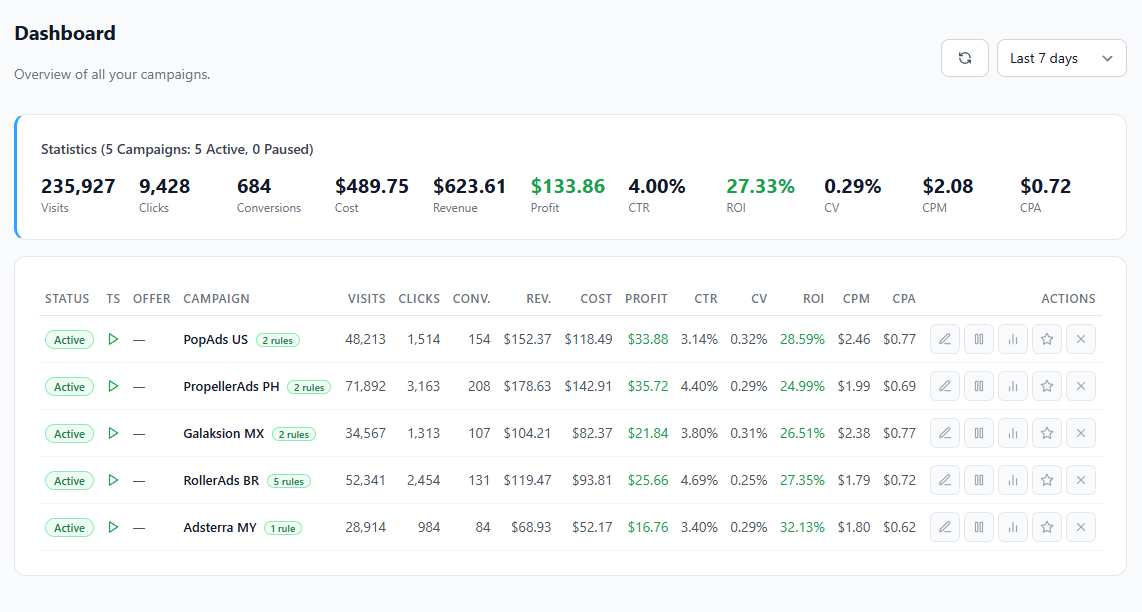
Optee Dashboard

Connects with your favorite platforms

Adcash Adscore Adsterra BeMob Clickadu Galaksion HilltopAds MaxConv Monetag Mondiad PropellerAds RollerAds Skro Voluum

Everything You Need in One Dashboard

Stop switching between tabs. Optee pulls data from all your platforms and displays it side by side in a single unified view.

Unified Analytics

All Your Data in One Table

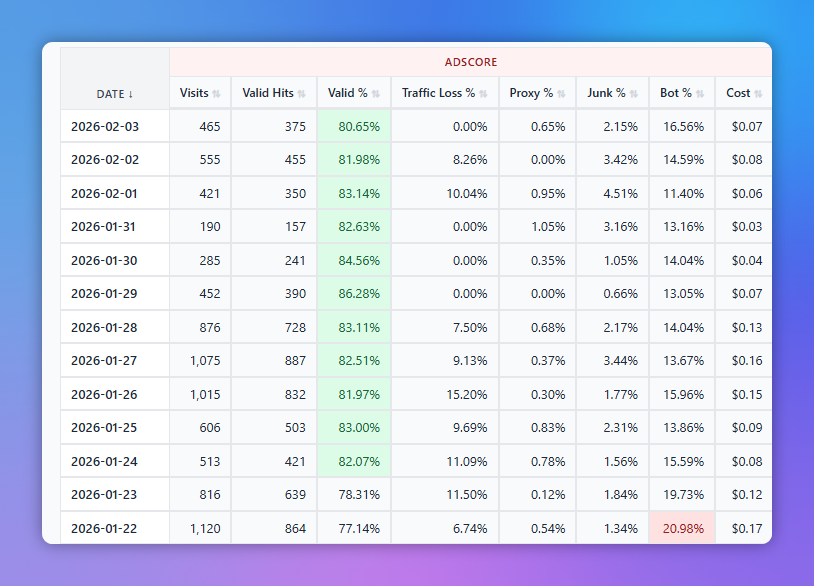
Optee pulls data from your traffic source, tracker, antifraud tool, and monetization platform, and displays it all side by side with color-coded column groups.

  • Impressions, clicks, cost from your traffic source
  • Visits, conversions, revenue, ROI from your tracker
  • Valid %, bot %, proxy % from your antifraud tool
  • Earnings and eCPM from your monetization platform
Unified Stats Table
Reporting

One Click, One Report — See Exactly What the Automation Did

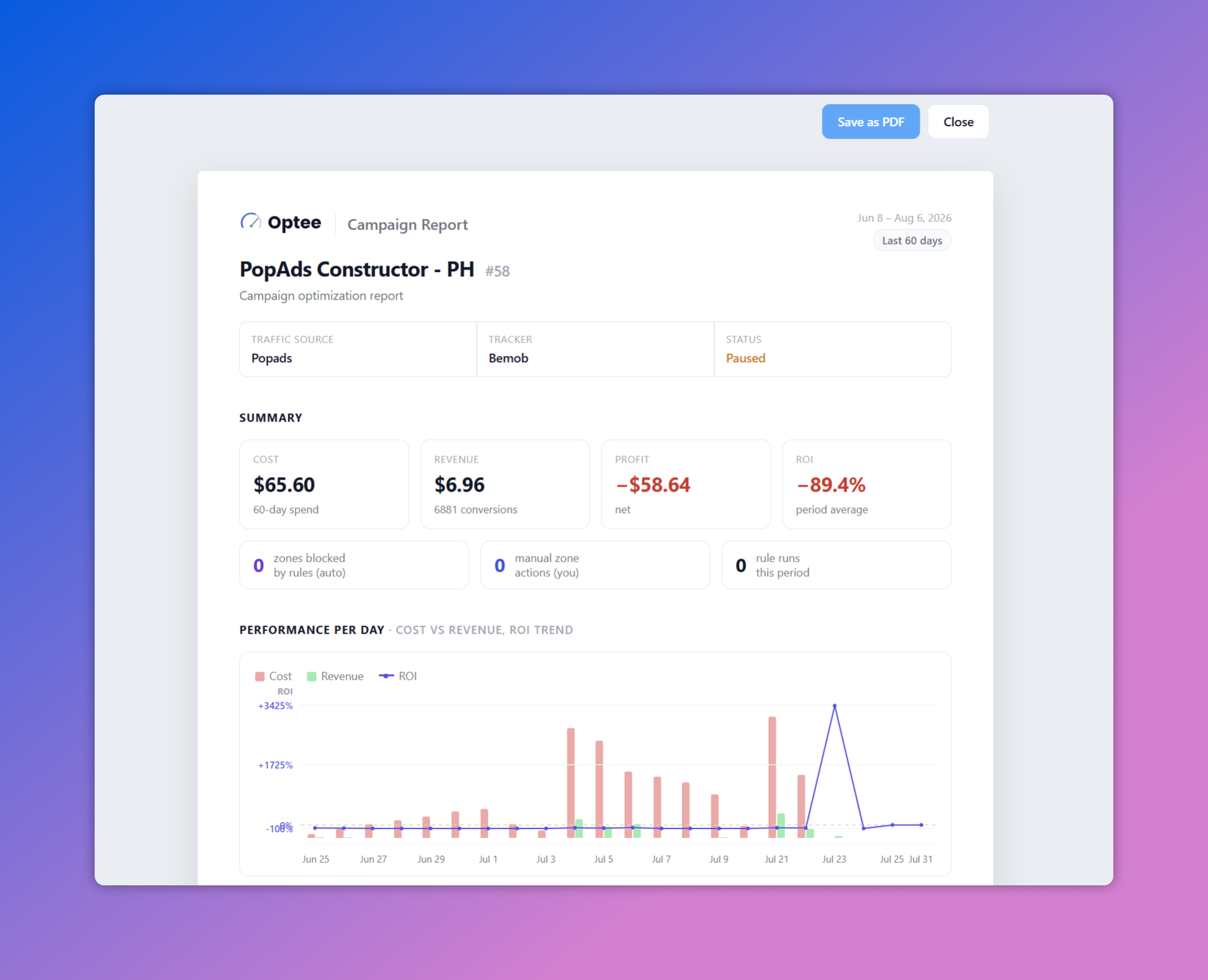
Every campaign generates a full optimization report: the P&L for the period, performance day by day, and a timeline of every change the rules made — what changed, when, and why. Save it as a PDF and you have a record you can actually share.

  • Summary P&L — cost, revenue, profit and ROI, compared against the previous period
  • Cost vs revenue per day with the ROI trend charted on top
  • Optimization timeline — every rule action and manual change, with the reason behind it
  • Every zone touched this period: who changed it, when, and how it's performing now
  • Estimated savings from blocked zones — the losing spend the rules cut out
Optee Campaign Report — summary P&L, zones blocked and rule-run counters, and a cost vs revenue per-day chart with ROI trend
Automation

Rules Engine That Works 24/7

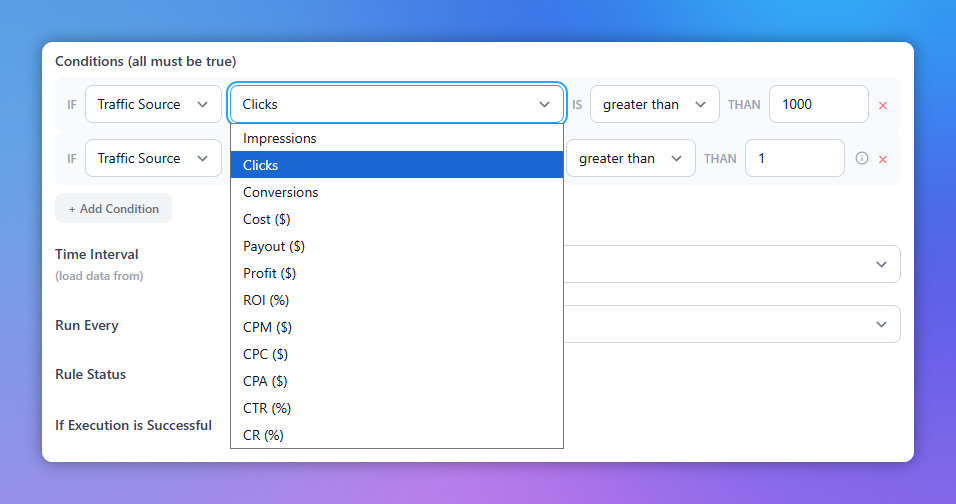
Create rules with conditions from any connected platform. Block zones, pause campaigns, or manage whitelists automatically based on real performance data.

  • Combine metrics from traffic source + tracker + antifraud
  • Preview rules before enabling (dry run)
  • Smart zone management with blacklists and whitelists
  • Automated offer status monitoring
  • Snooze any rule temporarily — pause it without deleting it
Rules Engine That Works 24/7
Financial Tracking

Earnings, Costs & Balances

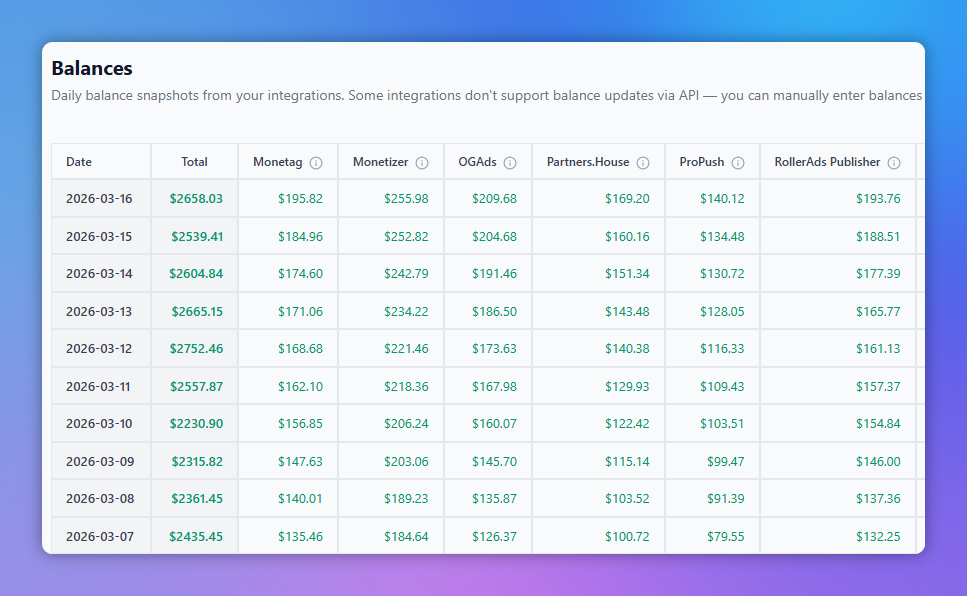
Track your daily revenue and cost across all integrations. See your P&L at a glance and compare numbers side by side to spot click loss discrepancies.

  • Daily earnings breakdown per platform
  • Real-time balance monitoring across all accounts
  • Low balance alerts
  • Profit/loss and ROI calculations
Earnings, Costs & Balances
Alerts

Get Emailed Before a Campaign Bleeds Out

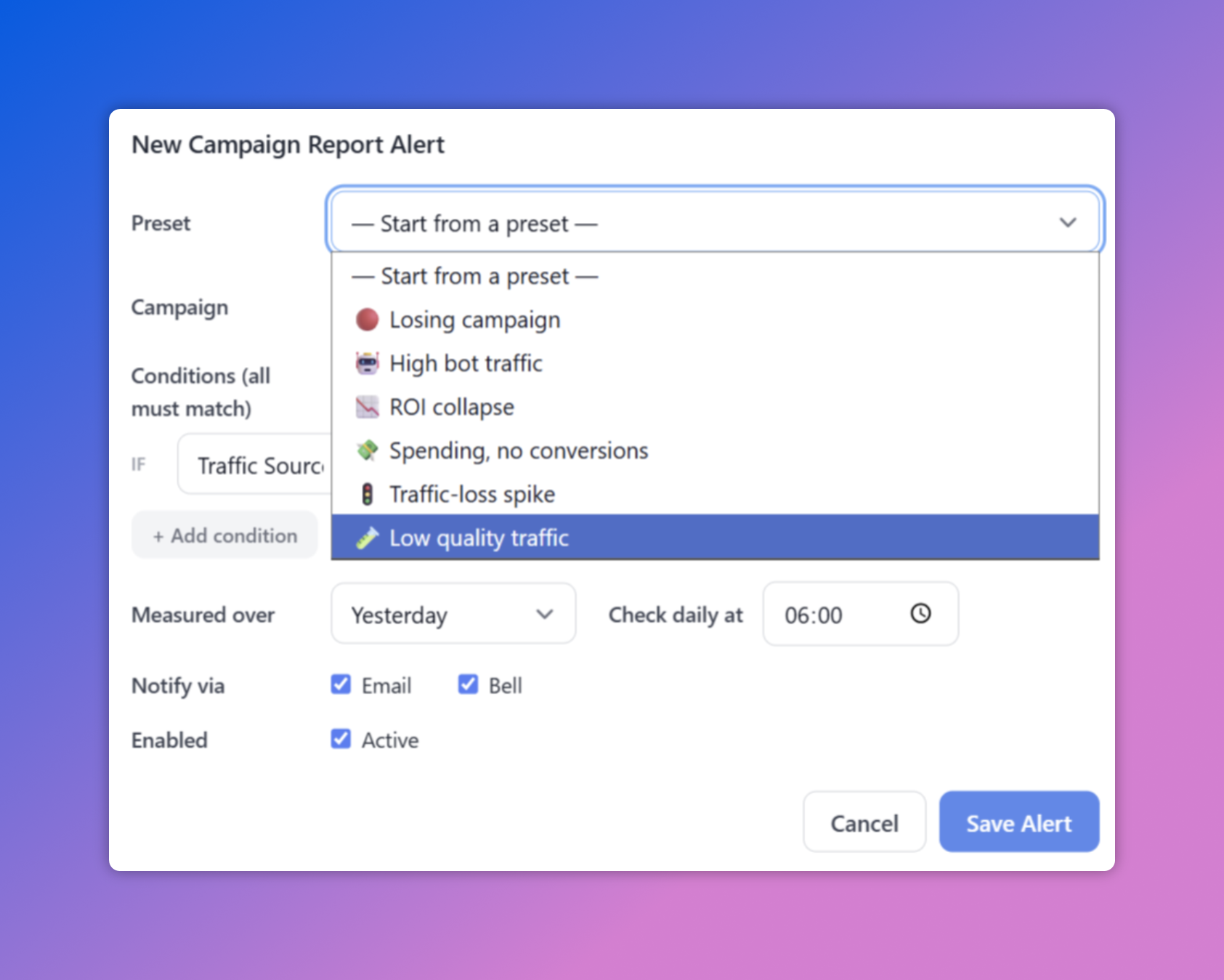
Set threshold alerts on balances and campaign performance. Optee checks on your schedule and emails you — plus pings the in-app bell — the moment something needs attention.

  • Balance alerts when any traffic source, network, or monetization balance crosses a threshold
  • Campaign alerts on profit, ROI, bot %, traffic loss and more — evaluated on real data
  • One-click presets: Losing campaign, ROI collapse, High bot traffic, Traffic-loss spike…
  • Runs on your schedule (e.g. daily at 6 AM), delivered by email and in-app bell
New Campaign Report Alert — presets, conditions, schedule, and email & bell notifications
Trends

Spot Zone Trends Day by Day

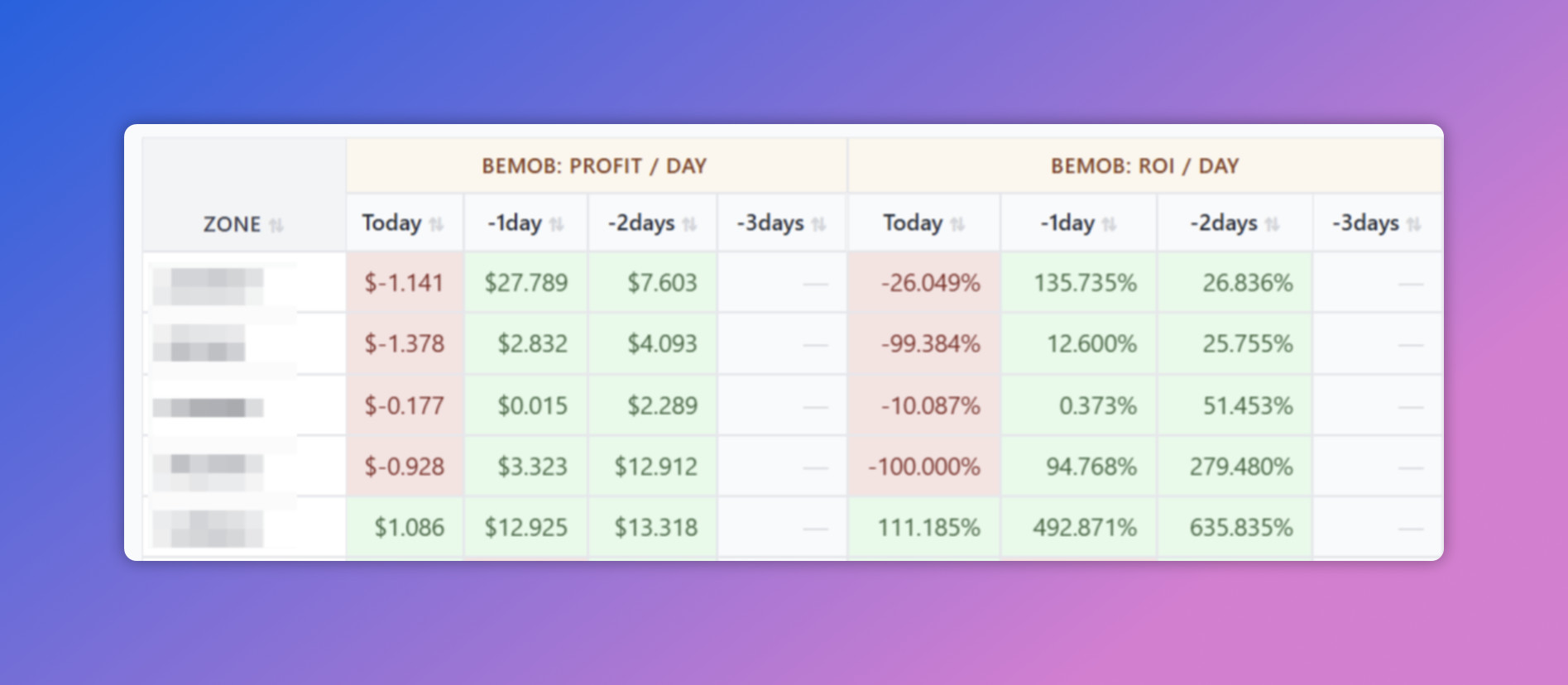
Add optional per-day columns to your zone report and see Today versus the last few days for every zone, side by side. Catch momentum and fatigue long before a single daily total would show it.

  • Per-day columns for any metric — profit, ROI, cost, and more
  • Today / −1 / −2 / −3 days for every zone, side by side
  • Color-coded green/red so decaying and heating-up zones jump out
  • Loads progressively, respecting your tracker's rate limits
Per-day breakout — Today, -1day, -2days, -3days profit and ROI columns per zone

Where Do You Find Hot Offers?

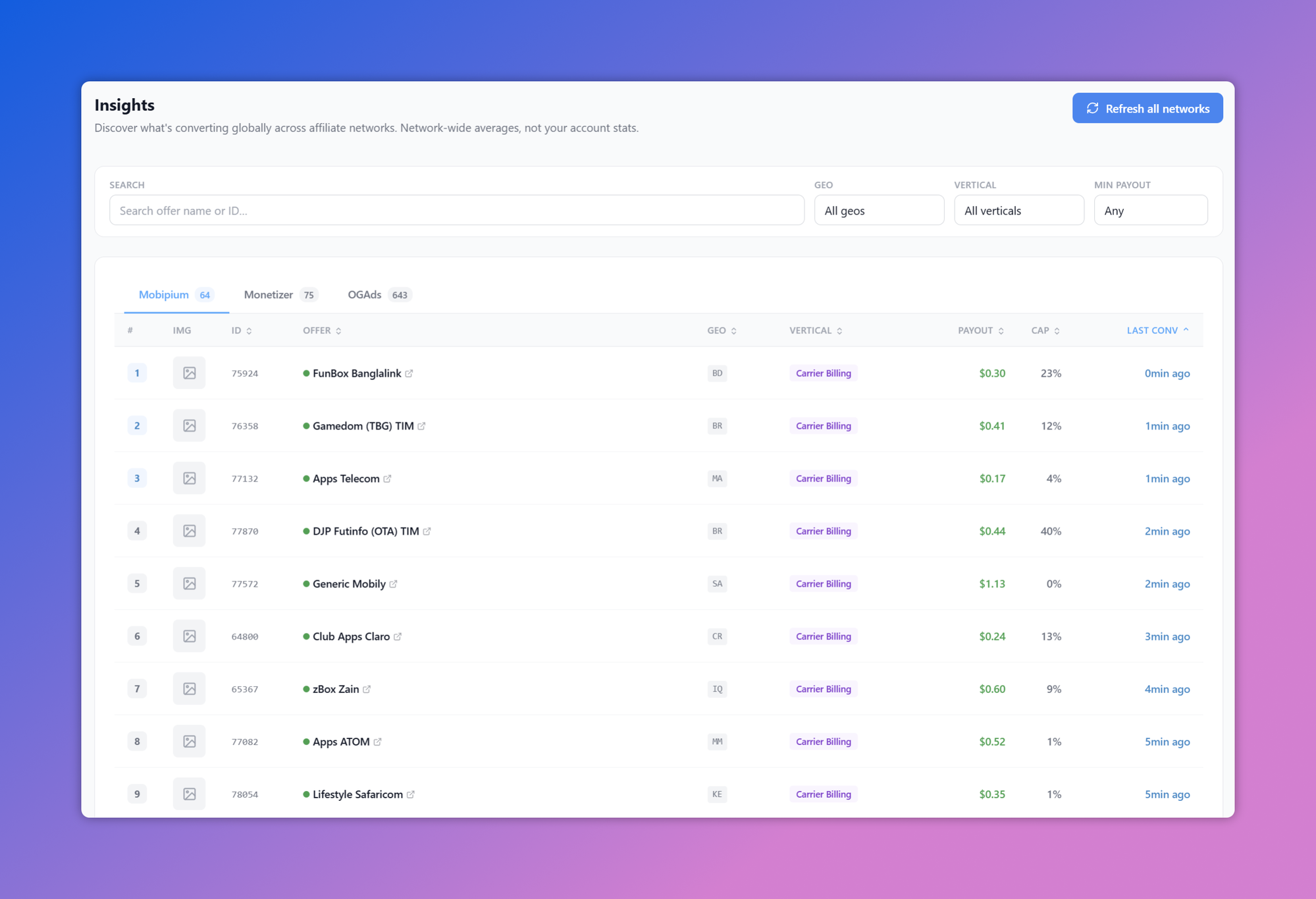
Finding offers that actually convert is half the battle. Insights shows you what's converting network-wide — not just on your own account — with the last conversion time on every offer.

Offer Discovery

See What's Converting Right Now

Most offer lists tell you what worked last month. Insights pulls network-wide conversion data across your affiliate networks and stamps every offer with its last conversion — so you can tell at a glance that it's live and paying right now.

  • Network-wide conversion data — real global averages, not just your own account's stats
  • "Last conversion" time on every offer (0 min ago, 1 min ago…) — proof it's live and converting
  • Filter by GEO, vertical, and minimum payout to match your traffic
  • Browse across all your networks — Mobipium, Monetizer, OGAds and more — in one place
Insights — network-wide offer conversion data across affiliate networks, with last-conversion times

Built for Power Users

Tools that save you time and money every day.

Productivity

Command Palette (Ctrl+K)

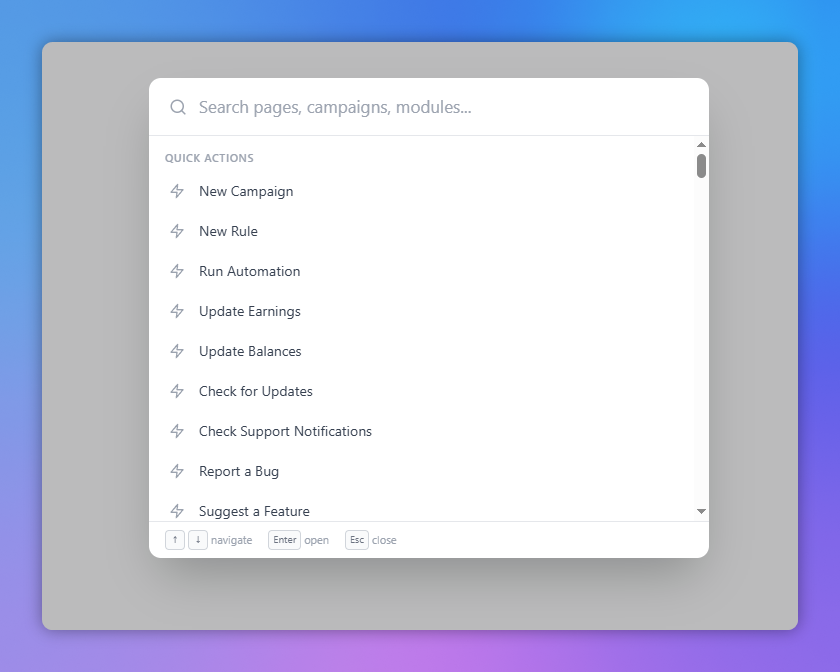
A spotlight-style search that lets you navigate the entire app without touching the sidebar. Press Ctrl+K and start typing.

  • Jump to any page, campaign, or module config instantly
  • Quick actions: create campaigns, run automation, fetch earnings
  • Search knowledgebase articles
  • Report bugs and suggest features directly
Command Palette
Security

VirusTotal Monitoring

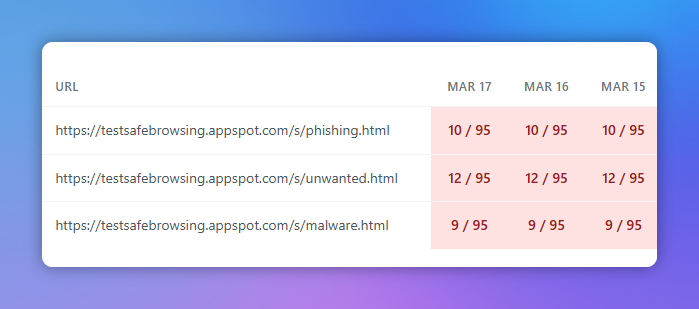
Monitor your domains and landing pages against 90+ security vendors. Know immediately when something gets flagged before it costs you traffic.

  • Scan any URL against 90+ antivirus engines
  • Track score changes over time
  • Identify which vendors are flagging your domains
  • Automated periodic scans via cron
VirusTotal Monitoring
Savings

Bonuses & Promo Codes

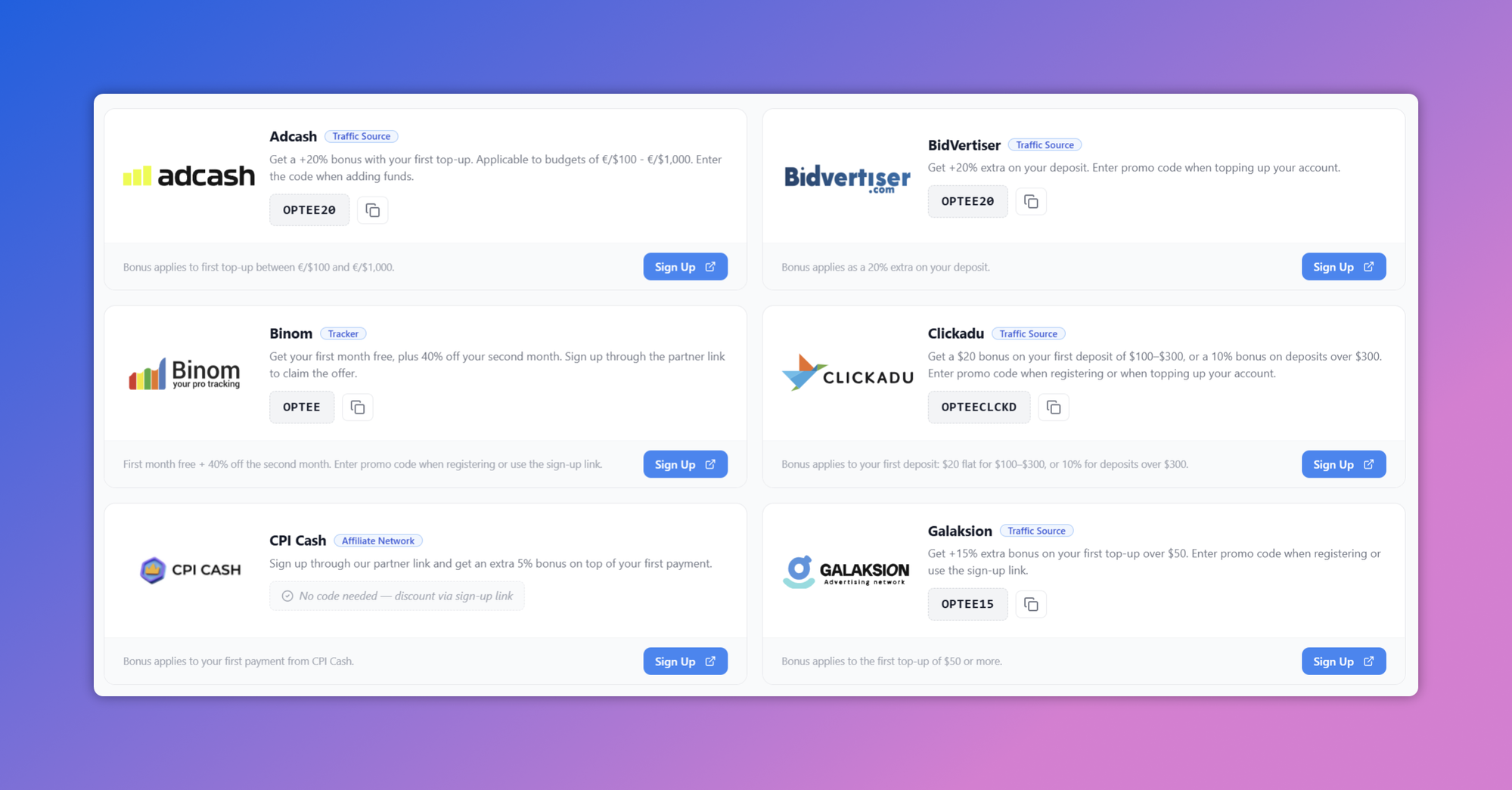
Exclusive deals and promo codes from our partner platforms, all in one place. Save money on traffic, trackers, and affiliate networks.

  • Curated bonus deals from top traffic sources
  • Tracker discounts and free trial extensions
  • Affiliate network sign-up bonuses
  • One-click sign-up links with promo codes pre-applied
Bonuses & Promo Codes
Free Landing Pages

100 Ready-to-Run Landing Pages, Free

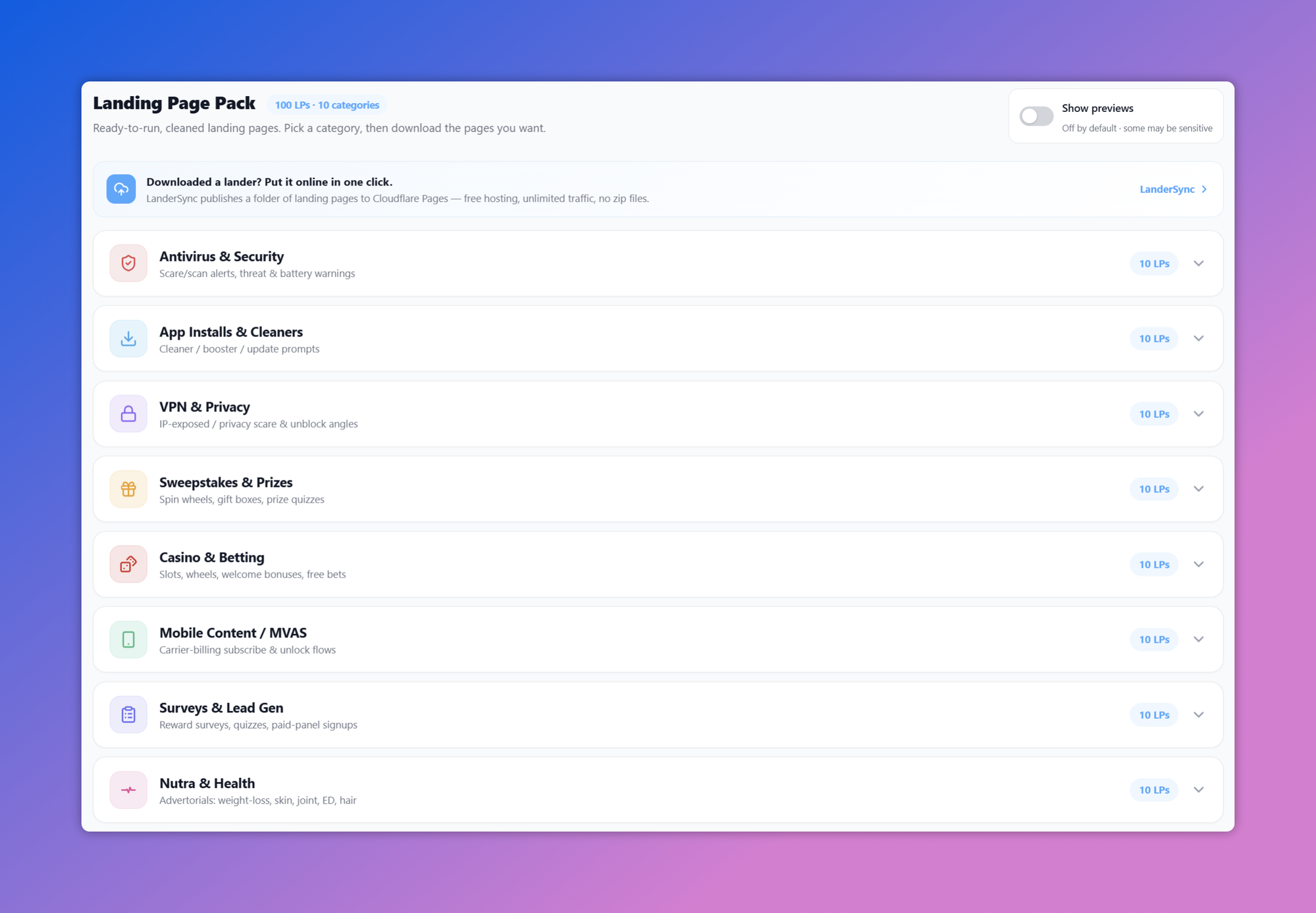
Every Optee install comes with a pack of 100 landing pages — 10 pages across each of 10 verticals, cleaned and self-contained. Pick a category, preview the pages, download the ones you want. No opt-in, no upsell, no per-page fee.

  • 10 categories — antivirus, app installs, VPN, sweepstakes, casino, mobile content, surveys, nutra, push and crypto
  • Cleaned and self-contained — dead trackers, off-site calls and broken assets stripped out
  • Preview any page in the browser before you commit to it
  • Download and drop it on your own domain — or publish the folder straight to Cloudflare Pages with LanderSync
Landing Page Pack — 100 landing pages across 10 categories, each with a preview and download
Publishing

One Folder. One Button. One Live Link.

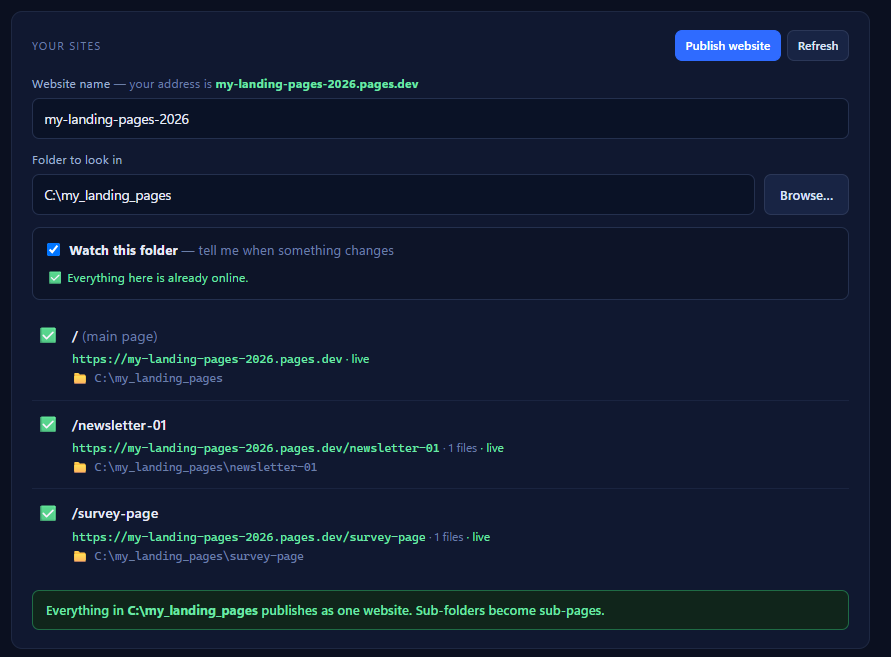
Downloaded a lander — now what? Hosting on Cloudflare Pages is free and takes unlimited traffic, but the workflow is the annoying part: zip, upload, wait, repeat for every edit. LanderSync is a small free app that does that part for you. Point it at the folder your landers are in, press Publish, and you get a live URL.

  • Publishes a whole folder at once — ten landers go live in one press, not ten uploads
  • Re-uploads only what changed — fix one headline, push one file, in about a second
  • Flags any lander that no longer matches what's live, but never publishes on its own
  • Every publish is kept — roll back to an earlier version and your old pages are live again
  • Free, open source (MIT), no account to create, no telemetry. Note: Cloudflare can't scope a token to one Pages project, so use a separate free Cloudflare account if you run client work
Get LanderSync + 10 Free Landers
LanderSync — your sites, the folder to publish, and the live URLs
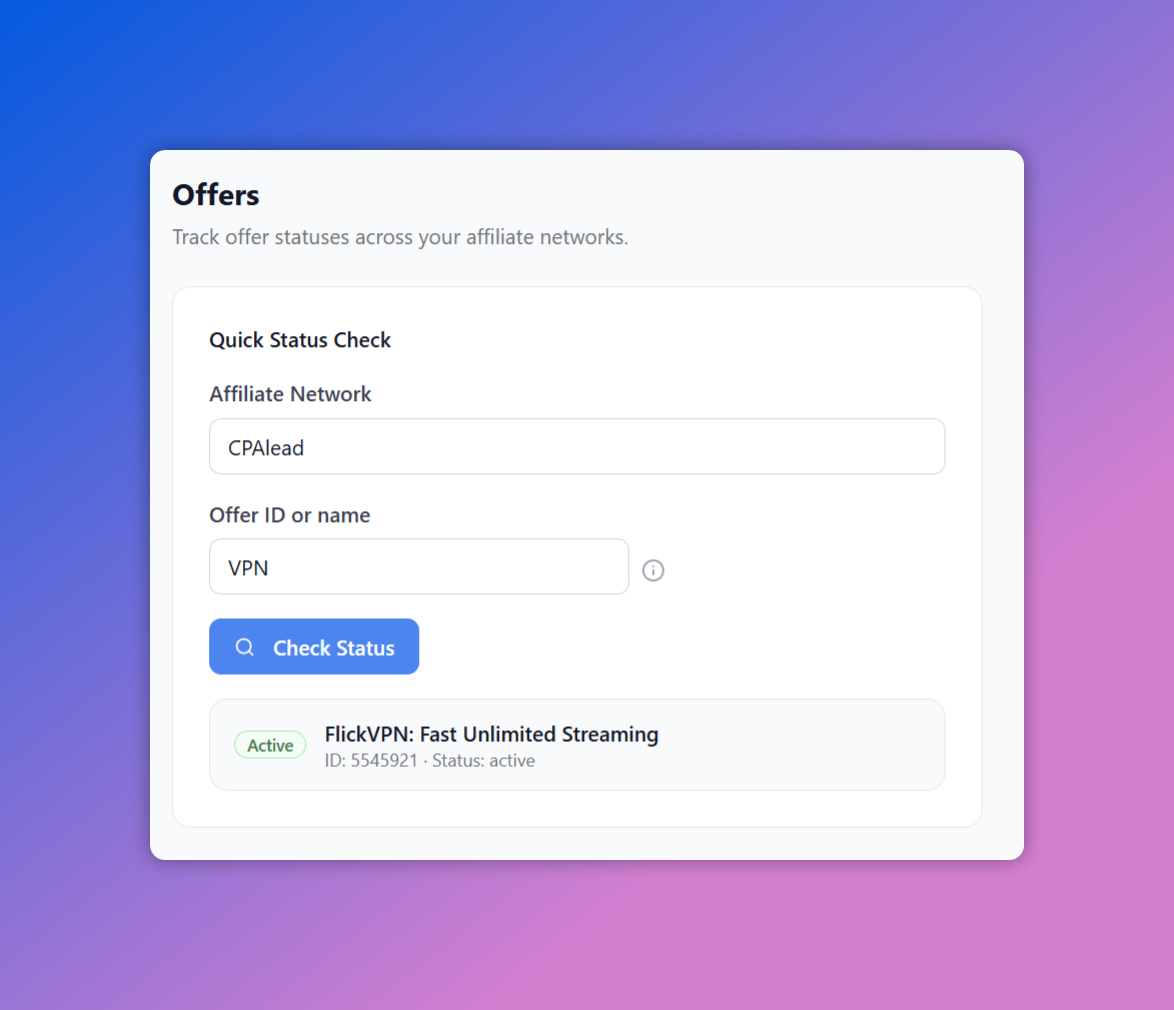
Offer Status

Know an Offer's Status Before You Send Traffic

Run a quick status check on any offer across your affiliate networks — search by ID or name and get its live active/paused status in seconds. Never burn budget on a dead offer again.

  • Quick Status Check — pick a network, search by offer ID or name
  • Live active/paused status pulled straight from the network's API
  • Copy offer IDs in one click for your campaigns
  • Powers the automation: rules auto-pause traffic when an offer goes inactive, and resume when it's back live

Offers — quick status check across affiliate networks, showing active/paused offers by ID or name


Export

Take Your Data Anywhere

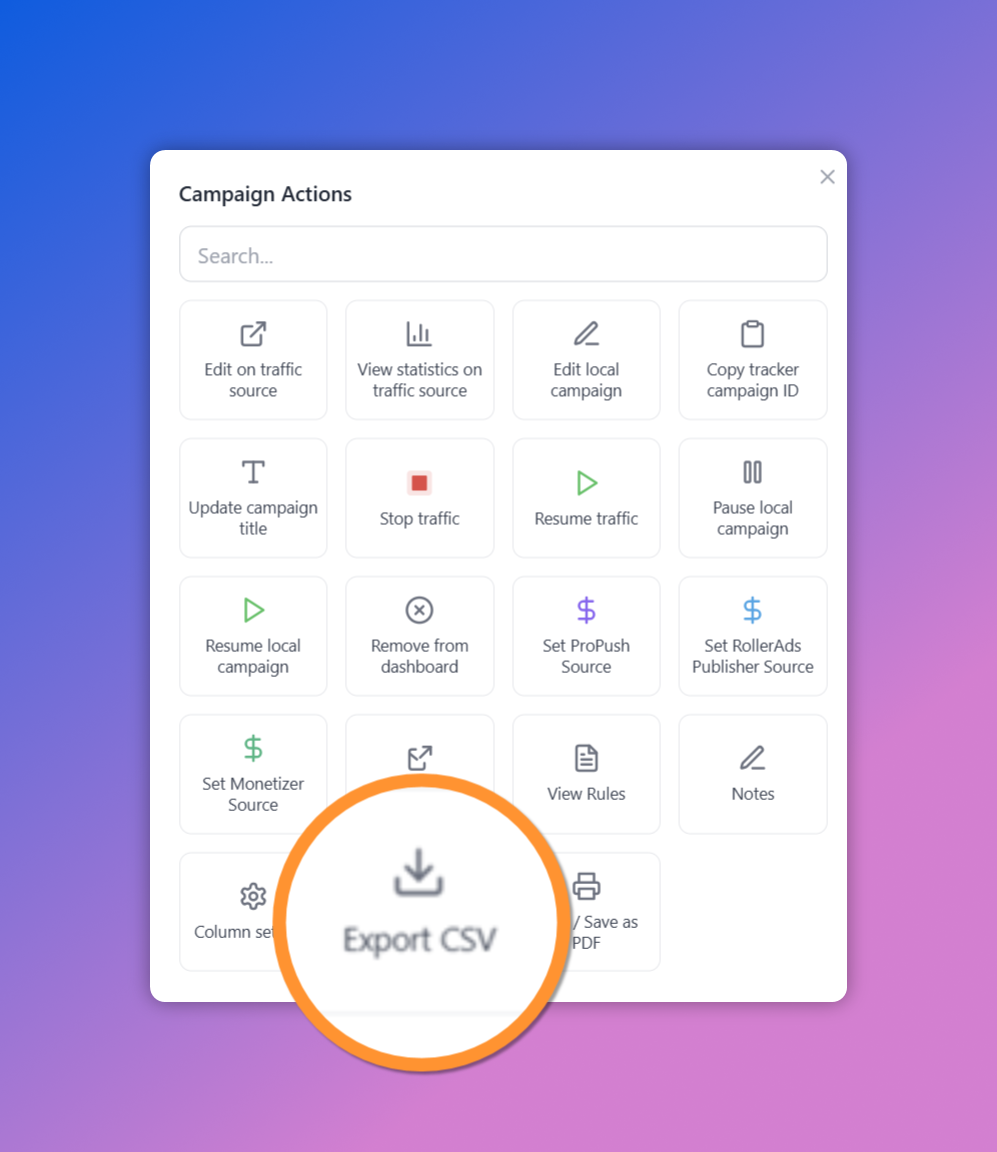
Export any campaign report to CSV for your own spreadsheets and analysis, or Print / Save as PDF for sharing and record-keeping — right from the Campaign Actions menu.

  • Export any report to CSV in one click
  • Print or Save as PDF for sharing and archiving
  • Exports exactly what you see — your columns, filters, and drilldown
  • Part of a rich Campaign Actions menu — export, edit, pause, and more in one place
Campaign Actions menu with Export CSV and Print / Save as PDF highlighted

How Does Automation Work?

Connect your platforms, create rules based on real metrics, and let Optee optimize your campaigns around the clock.

01

Block Losing Zones

Zone has spent more than $2 with tracker ROI worse than -50% over the last 7 days

Block Zone
02

Pause Bad Campaigns

Campaign spend exceeds $50 and ROI is below -30% over the last 3 days

Pause Campaign
03

Monitor Offer Status

Affiliate network reports offer status as "Paused" or "Inactive"

Pause Traffic

Rules in Action

From creating a rule to seeing it run automatically — here's what the workflow looks like.

Step 1

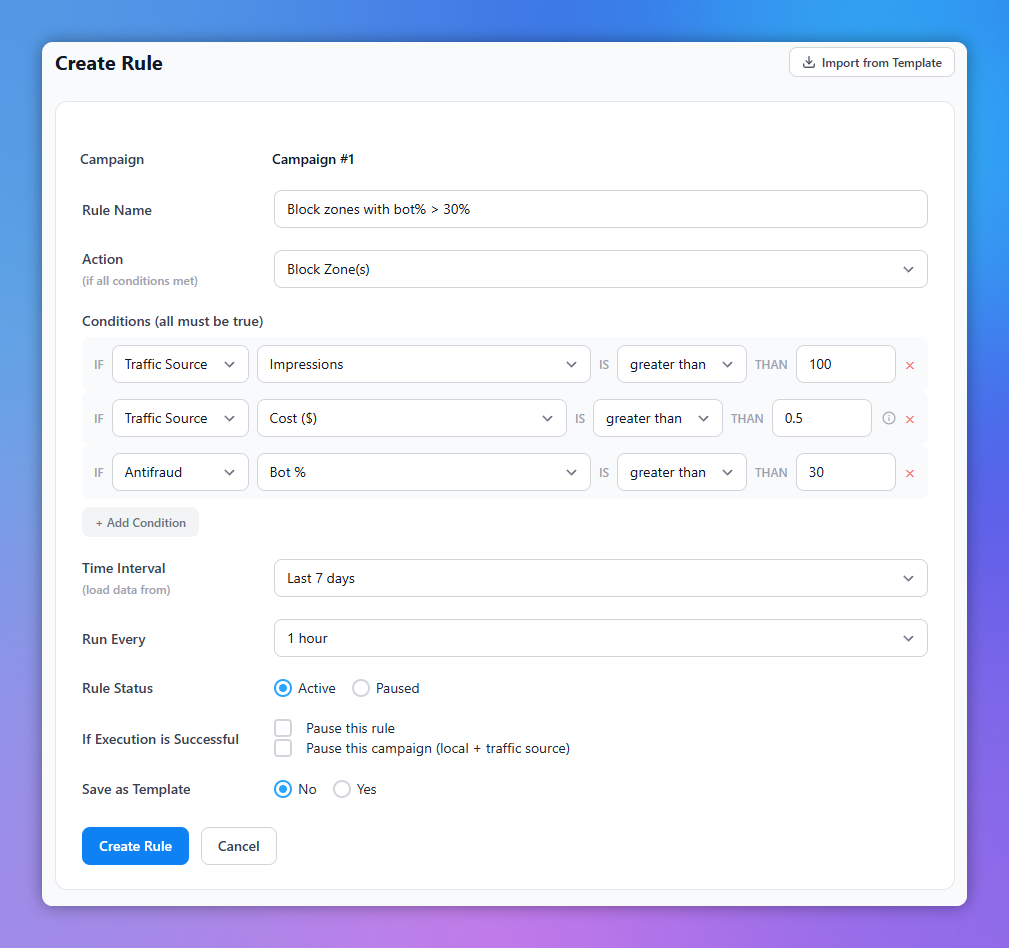
Create a Rule

Pick a campaign, define conditions using metrics from any connected platform, choose an action, and set how often it should run.

  • Select campaign and condition source (traffic source, tracker, antifraud)
  • Build conditions: metric, operator, value
  • Choose action: block zones, pause campaign, manage whitelist
  • Set timeframe and run interval
Create a Rule
Step 2

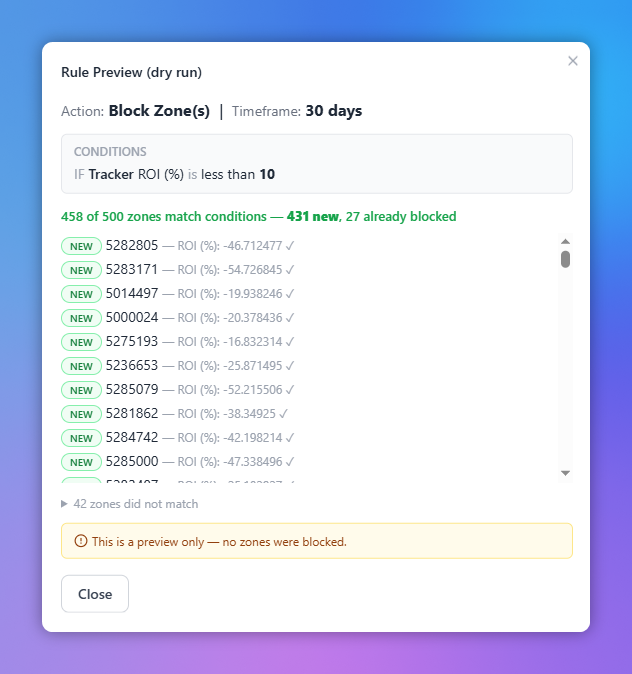
Preview Before You Enable

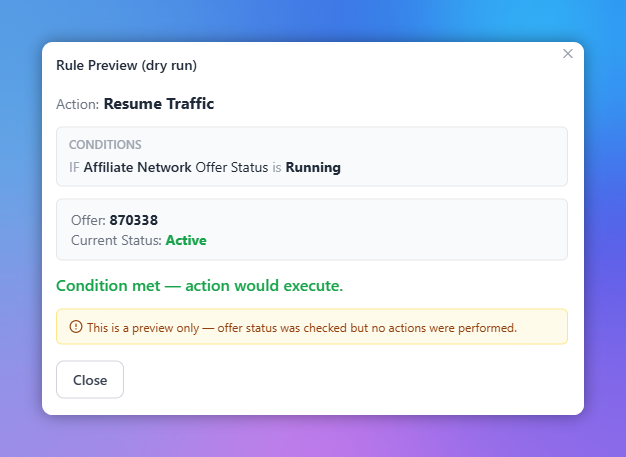
Every rule can be previewed with a dry run. See exactly which zones would be affected and why, before enabling it.

  • Dry run shows matching zones with actual metric values
  • See which zones are new matches vs already blocked
  • Non-matching zones listed separately for review
  • No changes made until you're confident
Rule Preview (Dry Run)
Step 3

Auto Pause & Resume Traffic

Create rules that monitor your offer status via the affiliate network API. When an offer goes paused, Optee pauses your traffic automatically. When it comes back live, traffic resumes.

  • Monitor offer status in real time via affiliate network API
  • Automatically pause campaigns when offer goes inactive
  • Automatically resume traffic when offer is back live
  • Never waste budget on a dead offer again
Auto Pause & Resume Traffic

Other Key Features
to Make Your Life Easier

Optee is packed with tools designed specifically for affiliate marketers running push, pop, and redirect traffic.

One-Click Install

Install integrations directly from the app. No FTP, no manual uploads. Click "Install" and you're connected.

Command Palette

Press Ctrl+K to open a spotlight-style search. Jump to any page, campaign, module, or action instantly.

Knowledgebase

Built-in guides and documentation for every integration. Learn how to set up API keys and optimize campaigns.

Auto Updates

One-click updates for the core plugin and all integrations. Stay current without touching your server.

Zone Database

Track every zone you've seen across all campaigns. See historical performance data and identify patterns.

Support Portal

Built-in bug reporting and feature requests. Get notifications about ticket updates directly inside the app.

VirusTotal Monitoring

Monitor your domains and landing pages against 90+ security vendors. Get alerted when scores change.

Bonuses & Promo Codes

Exclusive deals and promo codes from our partner platforms. Save money on traffic, trackers, and more.

100 Free Landing Pages

A pack of 100 cleaned, ready-to-run landing pages across 10 verticals. Preview in the browser, download as a zip.

All Integrations

Optee connects with 30+ live integrations across traffic sources, trackers, affiliate networks, antifraud tools, and monetization platforms — including free, self-hosted trackers like Simple KUMA. More ship every month.

Adcash Advertizer BidVertiser Clickadu Galaksion HilltopAds Mondiad PopAds PopCash Adsterra PropellerAds Push.House RollerAds
AdsBridge
BeMob Binom
ClickFlare
FunnelFlux Pro
MaxConv
PeerClick
RedTrack
Simple KUMA Skro Voluum
CPV Lab Pro
CPV One
Keitaro
CPAGrip CPAlead CPI Cash Mobipium Monetizer OGAds Traffic Company CpaRoll iMonetizeIt MyLead PDL-Profit Zeydoo
HilltopAds Publisher Monetizer ProPush Monetag Partners.House RollerAds Publisher

Simple Pricing

No tiers, no per-campaign fees, no limits.

FREE

for affLIFT members — forever

Claim your key during Beta and Optee stays free for you, for life.
No card, no trial, no expiry.

When Beta ends, new users pay $19.99/mo or $349.99 lifetime. Keys claimed during Beta are never charged.

Get Started Free on affLIFT

Get in Touch

Want to see your platform integrated? Have a partnership idea?

[email protected]

Ready to Automate Your Campaigns?

Join thousands of affiliate marketers who are already using Optee to optimize 24/7.

Get Started Free